
This post contains affiliate links. If you buy through them, we may earn a commission at no extra cost to you.
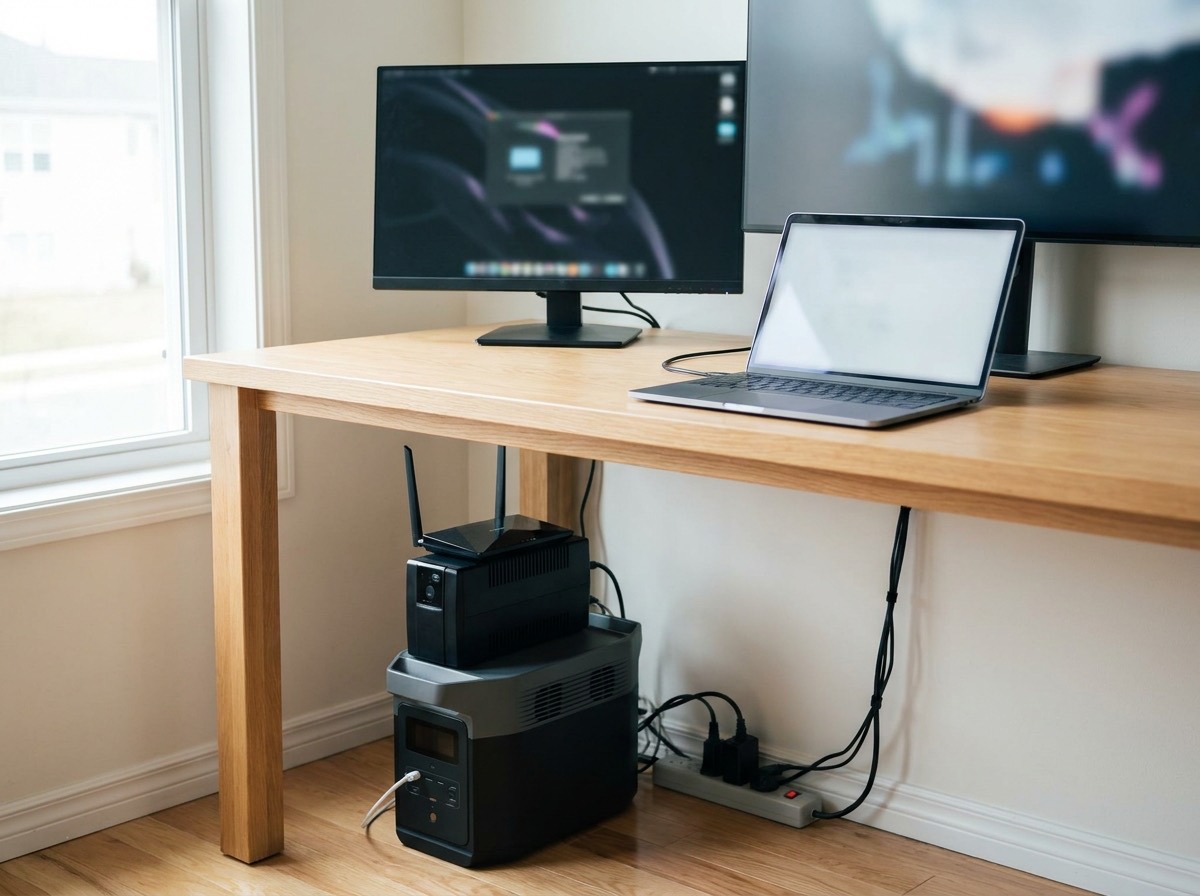
Short answer: for a home office, a UPS and a portable power station solve two different problems. A UPS (uninterruptible power supply) is built to bridge the first few milliseconds and minutes of an outage so your desktop computer, monitor, and network gear never see a flicker. A power station is built to run those same devices for hours or days. A 1,500VA UPS keeps a typical desk alive for 10 to 20 minutes, long enough to save work and shut down. A 1kWh power station with UPS mode keeps the same desk running for 8 to 12 hours. Many remote workers end up with both: a small UPS on the router and modem, and a power station for the workday.
What Each Device Is Actually Designed To Do
| UPS | Portable Power Station | |
|---|---|---|
| Primary job | Prevent any interruption; protect against surges and brownouts | Provide hours of power away from the grid |
| Switchover time | 0 ms (online/double conversion) to 8 ms (line-interactive) | 10 to 30 ms on models with UPS/EPS mode; some have none |
| Typical runtime for a 200W desk | 10-25 minutes | 4-12 hours |
| Battery type | Sealed lead-acid (3-5 year life) or lithium on newer units | LiFePO4 (10+ year life) |
| Cost per watt-hour stored | High | Low |
| Power conditioning | Excellent on line-interactive and online units | Clean output, but passes through grid power unfiltered in most bypass modes |
| Portability | Sits under the desk permanently | Moves to the kitchen, the car, or the campsite |
| Software shutdown | Yes, via USB to the computer | Rarely |
Why Switchover Time Decides It for Desktops
A desktop computer’s power supply holds enough energy to ride through roughly 10 to 20 milliseconds of lost power. A UPS switches to battery in 2 to 8 milliseconds, well inside that window, so the computer never notices. Most portable power stations with a “UPS mode” or “EPS mode” switch in 10 to 30 milliseconds. Some modern units are fast enough; others cause a reboot on sensitive power supplies. Manufacturers publish the number. Under 20 milliseconds is generally safe for a PC; under 10 is safe for almost everything.
Laptops do not care. They have their own battery and simply switch to it. The same is true of phones and tablets. If your entire office runs on a laptop, the switchover question disappears and the power station wins outright on runtime.
Network gear is the hidden variable. Your modem, router, and fiber ONT (optical network terminal) reboot on any interruption and take 2 to 5 minutes to come back. During a video call, that is the whole problem. A small UPS on the network gear alone, drawing perhaps 20 to 40 watts, runs for hours and keeps the connection up through short outages, which are the most common kind.
Sizing a UPS for a Home Office
UPS units are rated in volt-amps (VA) and watts. Use the watt rating, which is typically 60 percent of the VA. Add up the running draw of everything that will plug into the battery-backed outlets:
| Device | Typical Draw |
|---|---|
| Cable modem + Wi-Fi router | 15-30W |
| Fiber ONT | 5-15W |
| Laptop and charger | 30-65W |
| Desktop PC (office use) | 80-200W |
| Desktop PC (gaming or workstation) | 300-700W |
| 27-inch monitor | 25-50W |
| Desk lamp (LED) | 5-10W |
| Laser printer (avoid on UPS) | 400-1,300W in bursts |
A typical office desk with a desktop, one monitor, and network gear draws about 200 watts. A 900-watt (1,500VA) line-interactive UPS holds that for roughly 15 to 20 minutes. Never put a laser printer or a space heater on a UPS; the heater will drain it in seconds and the printer’s fuser surge can trip it.
Check the current price of 1500VA pure sine wave UPS units on Amazon
Sizing a Power Station for a Full Workday
Runtime = watt-hours × 0.85 ÷ average load. For the same 200-watt desk:
| Power Station Size | Desktop Office (200W) | Laptop Office (60W) | Laptop + Network Only (90W) |
|---|---|---|---|
| 500Wh | ~2 hours | ~7 hours | ~4.7 hours |
| 1,000Wh | ~4.3 hours | ~14 hours | ~9.4 hours |
| 2,000Wh | ~8.5 hours | ~28 hours | ~19 hours |
For a laptop-based remote worker, a 1kWh unit covers a full day with margin and still has capacity for the refrigerator overnight. For a desktop workstation, 2kWh is the practical minimum. Our best portable power stations for home backup roundup calls out which units have fast, reliable UPS mode; the Anker SOLIX C1000 and Bluetti AC180 are two popular 1kWh-class options in that category.
Check the current price of 1000Wh LiFePO4 power stations with UPS mode on Amazon
The Combined Setup Most Remote Workers Settle On
- A small UPS (600-900VA) on the modem, router, and ONT. This is the highest-value purchase in the whole list. It keeps the internet up through the 30-second and 5-minute blips that make up most outages, and a 30-watt network load runs an hour or more on a small unit.
- A power station with UPS mode under the desk. The desktop, monitor, and lamp plug into it; it stays plugged into the wall in pass-through mode. When the grid fails, the desk keeps running for hours. If the switchover is too slow for your PC, put the small UPS between the power station and the computer.
- Solar or a generator only if outages regularly exceed a day. A 200-watt folding panel adds roughly 0.8 to 1kWh on a sunny day, enough to extend a laptop office indefinitely.
Power Quality: Where the UPS Still Wins
Line-interactive and online UPS units actively correct low voltage (brownouts) and high voltage without switching to battery, and they filter surges continuously. In rural areas with unstable grid power, that conditioning protects expensive equipment every day, not just during outages. Most power stations in pass-through mode simply relay grid power and only step in when it drops out entirely. If your lights dim when the well pump kicks on, the UPS is doing work a power station will not.
The reverse is also true. Cheap UPS units output a “simulated” or “stepped” sine wave on battery. Some computer power supplies with active power factor correction click off or make a buzzing sound on stepped output. Pay the extra for a pure sine wave UPS; the difference is usually $40 to $80.
Battery Life and Replacement Cost
The UPS’s weak spot is its sealed lead-acid battery, which lasts three to five years, less in a warm room, and costs $30 to $80 to replace. Lithium UPS units are now available and last two to three times longer at about double the price. A LiFePO4 power station is rated for 3,000 or more cycles, which for occasional office backup is effectively the life of the device. Over ten years, a power station used this way costs less per usable watt-hour than any UPS.
When You Only Need One
- Buy only a UPS if your outages are short and rare, you run a desktop with sensitive peripherals, and you want automatic software shutdown.
- Buy only a power station if you work on a laptop, outages last hours, and you want the same battery to run the fridge, a CPAP, or a camping trip. Confirm it has an EPS/UPS mode under 20 milliseconds so the router does not reboot.
- Buy both if you work from home full time and your income depends on staying online. The small UPS costs less than one missed client call.
If the outages in your area are long enough that you are also thinking about a fuel generator, our comparison of power station vs generator lays out the trade-offs, and for anyone weighing a larger battery against a bigger generator, our list of the best power stations under $500 covers the entry-level options that pair well with a network UPS.
Frequently Asked Questions
Can a portable power station replace a UPS?
For laptops, phones, and most network equipment, yes, as long as the unit has an EPS or UPS mode with switchover under about 20 milliseconds. For desktop PCs with sensitive power supplies, test it; some reboot on slower switchover and need a small UPS in between.
How long will a UPS run my Wi-Fi router?
A router and modem drawing 30 watts on a 600VA (360W) UPS typically runs 45 to 90 minutes. On a 1,500VA unit, two to four hours.
Is it safe to leave a power station plugged in all the time as a UPS?
Yes on current LiFePO4 units from major brands. Set the charge limit to 80 or 90 percent in the app for daily use to extend battery life, and raise it to 100 percent before a storm.
Do I need a pure sine wave UPS for a computer?
For a modern desktop with an active PFC power supply, yes. Stepped or simulated sine wave output can cause shutdowns or buzzing. Laptops and routers are less picky.
What size power station do I need for a full workday on a laptop?
A 500Wh unit covers a laptop for about 7 hours; a 1,000Wh unit covers a laptop, monitor, and network gear for a full day with power to spare.